
Way back, running an MSP was my full time job. But when I bounced into contracting and regular permie-jobs, I kept on a handful of the smaller clients – we get on great, they have stable and mature environments (i.e. little sudden change), so it’s easy to keep them running in my spare time and it exposes me to different industries and scenarios that I might not see in whatever full-time role I have, keeping me sharp. It’s a win-win for everyone.
But there’s one obvious downside – I’m their IT guy, not their IT company. So to them it makes logical sense that when there’s a problem they email me. Not the support portal, not the support email address, me. 10+ years of trying to get them to change, and no success. This isn’t the most terrible thing in the world by any stretch. But it means things happen outside of the PSA and this makes it hard to review the work done, estimate time, and look for trends.
With many PSA/ticketing systems you can simply forward the email to your support address. Some logic kicks in that recognises you as a tech, and parses the original email to identify the sender and if they’re a contact creates a ticket in their name.
This can work, but a couple of things bothered me about it:
- the tickets arrive uncategorised, because of course the portal hasn’t been used
- some people are terrible at email subjects. Some people even use no subject. This makes it very difficult to triage using any sort of automation.
So I decided that I’m not going to simply forward emails to the PSA I use (SyncroMSP). I will create a complicated Power Automate flow to send the email to ChatGPT to make the title of the ticket better, then open a ticket on the PSA.
So in this blog post, not only will we use technology to solve a people problem – we will also avoid the easiest technical solution in favour of a more convoluted version that also costs money.
Why? Because it’s better. Is it that much better? Arguably.
Requirements
- To use Power Automate, you’ll need a licensed account that can use the Premium HTTP action. ‘Power Automate per user plan’ is what I use for this case.
- For OpenAI, you either need to fund your OpenAI account, or use Azure AI services. In this example, we will simply fund our OpenAI account and use this, since I’m still waiting on approval for Azure AI Services.
- These instructions are for SyncroMSP. But essentially this’ll work for any PSA with API access.
Overview of Process
The process will look like the below:
- we perform a very quick action in Outlook on the received email
- this will meet the trigger in Power Automate, initiating the flow
- Power Automate gets the customer/contact information from our SyncroMSP instance
- It sends the email text to OpenAI along with a prompt and receives the response
- the response is parsed and then used to create a ticket in our SyncroMSP instance
Power Automate Trigger
In a sane world, Power Automate would have a trigger for ‘when an email is categorized’. But this trigger does not exist as yet.
‘When an email is flagged’ works. But the problem is I (and no doubt many people) use flags. Plus we flag stuff accidentally. You don’t want an accidental flag of an email setting off some ticket workflow.
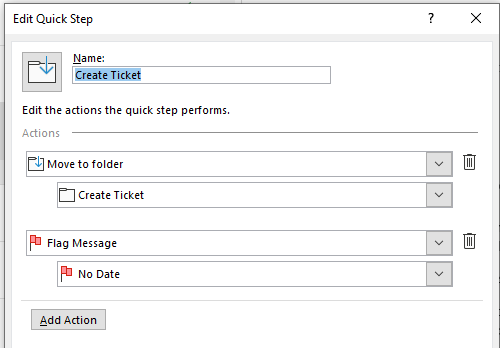
So I created a Quick Action in Outlook – the quick action first moves the email to a ‘Create Ticket’ folder then flags the email.
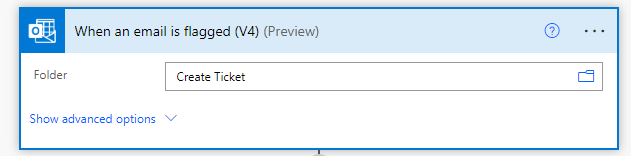
The trigger action in Power Automate can then be ‘When an email is flagged’ but scoped to the ‘Create Ticket’ folder – meaning you can happily continue to use flags elsewhere in your mailbox without accidentally triggering the flow.
Once the email is processed by Power Automate and the ticket raised, we will add additional steps to move it back in to your Inbox and mark it as complete – giving you a visual indicator that the process has been successfully applied.
Because of the length and high number of screenshots/code snippets in this blog post, we’ll split it into parts. The next section (where Power Automate gets the customer details from SyncroMSP) will be posted in the coming days.
Leave a Reply